
HP ProLiant SL170z G6 Server Maintenance and Service Guide



Contents 35
System Board Configuration
Processor
HP ProLiant SL170z G6 Server, with two 170 system boards, supports four-processor operation. With
two processors installed, each 170 server supports boot functions through the processor installed in
processor socket 1. However, if processor 1 fails, the system automatically boots from processor 2
and provides a processor failure message.
The processor socket supports Quad-Core Intel
Nehalem
5500
Series processor and Intel
Xeon
5600
Series processor.
CAUTION: It is recommended to use processors of same speeds or cache sizes to prevent possible
server malfunction.
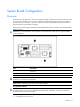
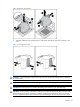
Figure 7 Processor locations
Item
Description
1 Processor 1
2 Processor 2
WARNING: To reduce the risk of personal injury from hot surfaces, allow the heatsink and the
processor to cool before touching them.
NOTE: Before installing the processor, remove the air baffle.
To remove the heatsink:
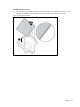
CAUTION: Heatsink screws should be tightened and loosened in opposite sequence. Do not
overtighten the screws as this can damage the system board, connectors, or screws. A maximum
torque of 6-8 in-lb is set for the system.
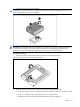
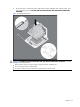
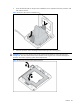
1. Loosen the first screw about three quarters out, then loosen the second screw completely.
2. Completely loosen the first screw.