Contents 34
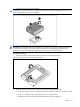
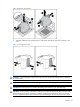
Figure 5 Installing the hard drive assembly
To remove hard drive assembly:
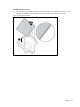
1. Slide the HDD Latches to unlock the HDD Handle.
2. Raise the HDD handle.
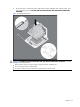
3. Lift the HDD from the tray.
4. Lower the HDD handle.
5. Lock the HDD carrier latches.
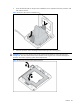
Figure 6 Removing hard drive assembly