
HP ProLiant SL170z G6 Server Maintenance and Service Guide



Contents 31
• Do not sharply bend any cable. A sharp bend can break the internal wires.
• Never bend a SATA data cable tighter than a 30 mm (1.18 in) radius.
• Never crease a SATA data cable.
• Do not rely on components like the drive cage, power supply, or system cover to push cables
down into the chassis.
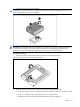
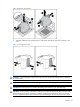
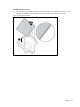
To remove the power supply cables from the system board connectors:
1. Squeeze on the top of the retaining latch attached to the cable end of the connector.
2. Grasp the cable end of the connector and pull it straight up.
CAUTION: Always pull the connector - NEVER pull on the cable. Pulling on the cable could damage
the cable and result in a failed power supply.
Figure 3 Unplugging power cables