
HP ProLiant SL165s G7 Server Software Configuration Guide



OS installation 36
OS installation
Supported OS
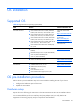
Table 24 Supported network operating systems (NOS)
NOS Version On-line information site
Microsoft Windows
•
Microsoft Windows Server 2008, Standard
Edition (x86 and x64) – SP2 and R2 w/SP1
•
Microsoft Windows Server 2008, Enterprise
Edition (x86 and x64) - SP2 and R2 w/SP1
•
Microsoft Windows Server 2008, Datacenter
Edition (x86 and x64) - SP2 and R2 w/SP1
•
Microsoft Windows Server 2008, Web Server
(x86 and x64) - SP2 and R2 w/SP1
•
Microsoft Windows HPC Server 2008 (x64) -
R2 w/SP1
Microsoft World Wide
Web:
http://www.microsoft.com
Microsoft Product Easy Set-
up Services:
http://www.Easy Set-
up.microsoft.com/directory
Microsoft Software BBS:
206-936-6735
Red Hat Linux OS
•
Red Hat Enterprise Linux 5.4 errata (x86 and
EM64T)
•
Red Hat Enterprise Linux 6 (x86 and EM64T)
•
SLES 10 (x86 and EM64T) SP3
•
SLES 11 (x86 and EM64T)
http://www.redhat.com
Sun Solaris Linux OS
•
Solaris 10 x86 U8, x64 U9
http://www.sun.com/sol
aris
Virtualization
•
VMWare ESX 4.0 U2, 4.1 U1
•
RedHat Virtualization (KVM)
•
SLES Xen
•
Citrix XenServer 5.6 U1
•
Microsoft Windows Hyper-V, R2 w/SP1
http://www.citrix.com
OS pre-installation procedure
Perform the two pre-OS installation steps in this section before installing the OS of your choice.
1. Configure the hardware aspect of the server.
2. Update the server BIOS.
Hardware setup
Prepare the server following the instructions in the HP ProLiant SL165s G7 Server Installation Sheet.
It is recommended that you do not install any third party adapter until you verify that the HP
equipment is functioning properly and you complete the OS installation.