
HP ProLiant SL160z G6 Server Software Configuration Guide


System BIOS configuration 19
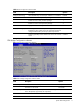
Table 11 IPMI Configuration submenu fields
Field Description
Watchdog
Configuration
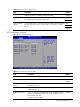
Select Watchdog Configuration in the left frame of the screen and press<enter> to go to
the submenu for that item. That will display POST Watchdog Timer Action, BMC Watch
Dog Time Out; you can change the default value.
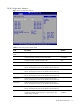
Serial Port
Configuration
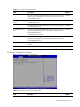
Select Serial Port Configuration in the left frame of the screen to go to the submenu for
that item. Then you can press Enter to enter its submenu. You can display a submenu
about Serial Port Configuration option by highlighting it using the <Arrow> keys.
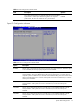
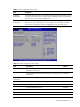
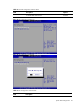
Figure 13 Set LAN Configuration submenu
Table 12
Set LAN Configuration submenu fields
Field Description Options
BMC NIC Allocation Shared mode: allow IPMI remote functions to run through the on-
board NIC’s network line.
Shared
Dedicated mode: allow IPMI remote functions to run through its own
network line.
Dedicated
BMC LAN
Configuration
IP Address obtained by user configuration. Static
IP Address obtained by BMC running DHCP. DHCP
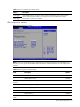
BMC Telnet Service To enable BMC Telnet Service. Enabled
To disable BMC Telnet Service. Disabled
BMC Ping Response To enable or Disable BMC Ping Response. Enabled
To disable BMC Ping Response. Disabled
BMC HTTP Service To enable or Disable BMC HTTP Service. Enabled