
HP ProLiant SL160z G6 Server Software Configuration Guide

System BIOS configuration 13
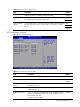
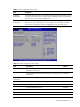
SATA Configuration submenu
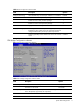
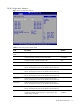
Figure 7 SATA Configuration submenu
Table 6
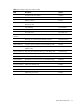
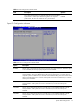
SATA Configuration submenu fields
Field Description Options
SATA#1 Controller
Mode
Disable SATA#1 controller Disabled
Configure SATA#1 controller to compatible mode Compatible
Configure SATA#1 controller to RAID mode RAID
Configure SATA#1 controller to AHCI mode AHCI
SATA Port1 While during POST, BIOS auto detects the presence of SATA
Device. This displays the status of auto detection of SATA devices.
SATA Port2 While during POST, BIOS auto detects the presence of SATA
Device. This displays the status of auto detection of SATA devices.
SATA Port3 While during POST, BIOS auto detects the presence of SATA
Device. This displays the status of auto detection of SATA devices.
SATA Port4 While during POST, BIOS auto detects the presence of SATA
Device. This displays the status of auto detection of SATA devices.
SATA Port5 While during POST, BIOS auto detects the presence of SATA
Device. This displays the status of auto detection of SATA devices.
SATA Port6 While during POST, BIOS auto detects the presence of SATA
Device. This displays the status of auto detection of SATA devices.
Drive Write Cache Drive Write Cache feature disabled on all dumb SATA drives. This
avoids the possibility of data loss due to a power failure. The
default setting is Disabled.
Disabled