
HP ProLiant SL160z G6 Server Maintenance and Service Guide



Connectors, Switches, and LEDs 60
LED Indicators
This section contains illustration and descriptions of internal and external status LED indicators located
on the:
• Front panel
• Rear panel
These LED indicators aid in problem diagnosis by indicating the status of system components and
operations of the server.
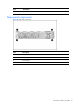
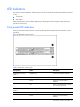
Front panel LED indicators
The front panel LED indicators allow constant monitoring of basic system functions while the server is
operating.
Figure 50 Health LED Indicator location
Table 5
Health LED indicator status
Components Status Description
Health LED indicator for
Node 1
Red(Blinking) Critical system failure detected
Amber (Blinking) System degrade
Green System in on and no failure
detected
Off System is off and there is no failure
prior to system power off
Health LED indicator for
Node 2
Red(Blinking) Critical system failure detected
Amber (Blinking) System degrade
Green System in on and no failure
detected