
HP ProLiant SL160z G6 Server Maintenance and Service Guide



Removal and Replacement Procedures 55
A new system fan can be installed to allow the server to operate properly in case a default system fan
becomes defective.
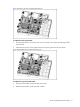
To remove the system fan:
1. Disconnect the fan cable from its corresponding board connector.
2. Lift the system fan away from the chassis.
Figure 45 Removing the system fan
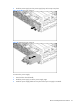
To replace the system fan:
1. Insert the system fan into the fan bracket.
2. Connect the fan cable to its corresponding board connector.
Figure 46 Installing the system fan