
HP ProLiant SL160z G6 Server Maintenance and Service Guide



Removal and Replacement Procedures 54
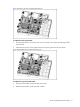
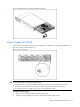
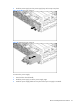
Figure 43 Removing the power supply
System Fan
The server can support either 3 or 4 system fans located at the chassis’ rears fan cage. Fan 1 is
optional. You can refer to Fan option Installation instructions for details.
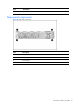
The figure below identifies the system fans by their device number and shows their corresponding
cable connections.
Figure 44 System fan connection
Device number
Connector
System fan 1 J6 on the AC power board
System fan 2 J8 on the AC power board
System fan 3 J10 on the AC power board
System fan 4 J11 on the AC power board