
HP ProLiant SL160z G6 Server Installation Sheet


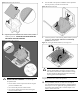
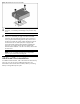


Figure 12 Installing the heat sink assembly
CAUTION: Be sure that the heat sink sits squarely on the
processor, or overheating and damage to the processor may
occur.
IMPORTANT: If the heat sink has been removed for any
reason, it is critical that you apply more thermal interface
material to the integrated heat spreader on the processor to
ensure proper thermal bonding between the processor and
the heat sink. Clean the contact surface of both the processor
and heat sink with an alcohol pad, then re-apply an HP-
approved thermal interface material before reinstalling the
processor. Use a pattern of five dots when applying the
thermal interface material—one dot in the center, and one dot
at each corner.
NOTE: Do not over tighten the heat sink’s spring-loaded
screws to prevent them from breaking off.
Additional Documentation
For additional documentation, refer to HP ProLiant SL160z G6 Easy
Set-up CD. You can also access additional information and
documentation from the HP external website, either by connecting
directly or through the Easy Set-up CD.