
ProLiant ML570 Generation 4 Server Maintenance and Service Guide

Server component identification 86
Online/activity
LED (green)
Fault/UID LED
(amber/blue)
Interpretation
On, off, or flashing Steadily blue The drive is operating normally, and it has been selected by a
management application.
On Amber, flashing
regularly (1 Hz)
A predictive failure alert has been received for this drive.
Replace the drive as soon as possible.
On Off The drive is online, but it is not active currently.
Flashing regularly
(1 Hz)
Amber, flashing
regularly (1 Hz)
Do not remove the drive. Removing a drive may terminate the
current operation and cause data loss.
The drive is part of an array that is undergoing capacity
expansion or stripe migration, but a predictive failure alert has
been received for this drive. To minimize the risk of data loss, do
not replace the drive until the expansion or migration is
complete.
Flashing regularly
(1 Hz)
Off Do not remove the drive. Removing a drive may terminate the
current operation and cause data loss.
The drive is rebuilding, or it is part of an array that is undergoing
capacity expansion or stripe migration.
Flashing irregularly Amber, flashing
regularly (1 Hz)
The drive is active, but a predictive failure alert has been
received for this drive. Replace the drive as soon as possible.
Flashing irregularly Off The drive is active, and it is operating normally.
Off Steadily amber A critical fault condition has been identified for this drive, and
the controller has placed it offline. Replace the drive as soon as
possible.
Off Amber, flashing
regularly (1 Hz)
A predictive failure alert has been received for this drive.
Replace the drive as soon as possible.
Off Off The drive is offline, a spare, or not configured as part of an
array.
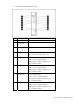
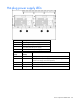
Memory board LEDs and components
Error indicators remain illuminated when the system is powered off so that the status of the LEDs can still
be seen. This matches the behavior of all the other error indicators in the server.
CAUTION: When the memory board locking switch is unlocked in a mode that does not
support hot-add or hot-replace capabilities, audio alarms and visual alerts occur. Removing the
memory board at this point causes server failure.
• To end the audio alarms and visual alerts, move the memory board locking switch back to
the locked position. This action does not result in data corruption or server failure.
• If removal of a single memory board is required and it is the only memory board, power
down the server and make the necessary memory changes.
Error indicators will only be cleared if:
• The locking switch is locked after the board is reinstalled
• The system has been rebooted