
ProLiant ML570 Generation 4 Server Maintenance and Service Guide

Server component identification 82
CAUTION: Clearing CMOS and/or NVRAM deletes configuration information. Be sure to
properly configure the server or data loss could occur.
NMI functionality
An NMI crash dump enables administrators to create crash dump files when a system is hung and not
responding to traditional debug mechanisms.
Crash dump log analysis is an essential part of diagnosing reliability problems, such as hangs in
operating systems, device drivers, and applications. Many crashes freeze a system, and the only
available action for administrators is to cycle the system power. Resetting the system erases any
information that could support problem analysis, but the NMI feature preserves that information by
performing a memory dump before a hard reset.
To force the OS to invoke the NMI handler and generate a crash dump log, the administrator can do any
of the following:
• Short the NMI jumper pins
• Press the NMI switch
• Use the iLO Virtual NMI feature
For additional information, see the whitepaper on the HP website
(http://h20000.www2.hp.com/bc/docs/support/SupportManual/c00797875/c00797875.pdf
).
System LEDs and internal health LED combinations
When the internal health LED on the front panel illuminates either flashing amber or flashing red, the
server is experiencing a health event. Combinations of illuminated system LEDs and the internal health LED
indicate system status.
NOTE: The system management driver must be installed for the internal system health LED to
provide pre-failure and warranty conditions.
The front panel health LEDs indicate only the current hardware status. In some situations, HP SIM may
report server status differently than the health LEDs because the software tracks additional system
attributes.
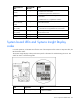
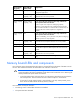
System LED and
color
Internal health
LED color
Status
Processor failure,
socket X (amber)
Flashing red One or more of the following conditions may exist:
• Processor in socket X has failed.
• Processor X is not installed in the socket.
• ROM detected a failed processor during POST.
Processor failure,
socket X (amber)
Flashing amber Processor in socket X is in a pre-failure condition.
PPM failure, slot X
(amber)
Flashing red
• PPM in slot X has failed.
• PPM is not installed in slot X, but the corresponding
processor is installed.