
ProLiant ML570 Generation 4 Server Maintenance and Service Guide

Removal and replacement procedures 61
4.
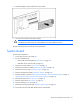
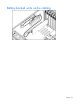
Remove the BBWC cache module from the controller.
5. Disconnect the cable from the cache module.
CAUTION: Do not detach the cable that connects the battery pack to the cache module.
Detaching the cable causes any unsaved data in the cache module to be lost.
To replace the component, reverse the removal procedure.
System board
To remove the component:
1. Power down the server (on page 28).
2. Do one of the following:
o Unlock and remove the bezel ("Tower bezel" on page 29).
o Extend the server from the rack (on page 28).
3. Remove the access panel ("Access panel" on page 31).
4. Remove the processor air baffle ("Processor air baffle" on page 38).
5. Remove the front fan cage. ("Front fan cage" on page 39)
6. Remove all expansion boards ("Expansion boards" on page 40).
7. Remove all memory boards ("Removing and installing a memory board (hot-plug)" on page 47,
"Removing and installing a memory board (non-hot-plug)" on page 50).
8. Remove the center wall. ("Center wall" on page 41)
9. Remove all processors ("Processor" on page 54).
10. Remove all PPMs ("PPM" on page 58).
11. Remove the memory board cage. ("Memory board cage" on page 52)
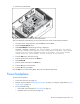
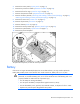
12. Disconnect all power and data cables from the system board.