
ProLiant ML570 Generation 4 Server Maintenance and Service Guide

Removal and replacement procedures 47
WARNING: To prevent personal injury from hazardous energy:
• Remove watches, rings, or other metal objects.
• Use tools with insulated handles.
• Do not place tools or metal parts on top of batteries.
Removing and installing a memory board (hot-plug)
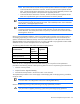
NOTE: The ProLiant ML570 G3/G4 memory board operates at different front-side bus speeds:
• In HP ProLiant ML570 Generation 4 Servers, the G3/G4 memory board operates at 800-
MHz. The HP ProLiant ML570 Generation 4 server only supports 800-MHz processors and
the memory board operates at the speed of the supported processors.
• In HP ProLiant ML570 Generation 3 Servers, the G3/G4 memory board operates at 667-
MHz with no performance gain over ProLiant ML570 G3 memory boards.
IMPORTANT: Installing a ProLiant ML570 G3 memory board in an HP ProLiant ML570 G4
Server forces the front-side bus speed to 667 MHz. If the installed processor has an 800-MHz
front-side bus, a message displays at POST.
IMPORTANT: The HP ProLiant ML570 G4 Server does not support hot-add of ProLiant ML570
G3 memory boards. Inserting the memory board generates an audio alert and the memory
board LEDs flash. The memory board does not power up. The board can be removed without
powering down the server.
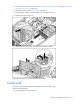
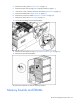
1. Do one of the following:
o Unlock and remove the bezel ("Tower bezel" on page 29).
o Extend the server from the rack (on page 28).
2. Remove the access panel ("Access panel" on page 31).
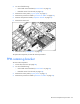
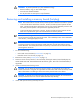
3. Determine which memory board is to be removed by locating the memory board that displays an
amber Board Status LED. The Board Removal LED must be green. Take note of the failed DIMM, if
applicable.
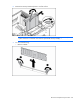
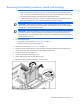
4. Unlock the memory board locking switch.
CAUTION: Do not attempt to unlock the memory board in an operational server when the
board removal LED is not green. This generates an audio alarm and causes the memory board
LEDs to flash amber. Proceeding to remove the memory board causes server failure.
CAUTION: To prevent server failure during a hot-plug removal procedure, do not remove the
memory board from the server until the board status LED stops flashing.
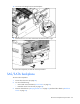
5. Unlock and open the memory board ejector lever.