
ProLiant ML570 Generation 4 Server Maintenance and Service Guide

Removal and replacement procedures 41
2.
Extend or remove the server from the rack ("Extend the server from the rack" on page 28, "Remove
the server from the rack" on page 29).
3. Remove the access panel. ("Access panel" on page 31)
4. Disconnect any internal or external cables from the expansion board.
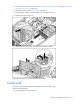
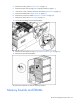
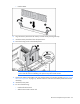
5. Release the front retaining clip.
6. Release the rear retaining clip and remove the expansion board.
To replace the component, reverse the removal procedure.
Center wall
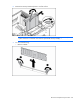
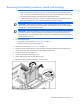
The center wall consists of the PPM retaining bracket and the mid fan cage.
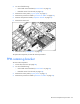
To remove the component:
1. Power down the server (on page 28).