
ProLiant ML570 Generation 4 Server Maintenance and Service Guide

Removal and replacement procedures 34
o
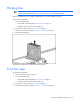
Unlock and remove the bezel ("Tower bezel" on page 29).
o Extend the server from the rack (on page 28).
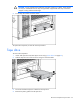
3. Remove the tape drive ("Tape drive" on page 32) or tape drive blank (on page 31).
4. Remove the rack bezel. ("Rack bezel" on page 33)
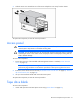
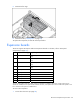
5. Using the Torx T-15 screwdriver ("Rear panel components" on page 78), remove the three T-15
screws.
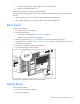
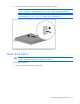
6. Press down on the tabs inside the media bay and remove the media bezel.
To replace the component, reverse the removal procedure.
Media drive or blank
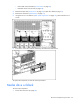
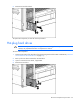
To remove the component:
1. Power down the server (on page 28).