
ProLiant ML570 Generation 4 Server Maintenance and Service Guide


Removal and replacement procedures 30
2.
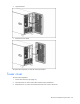
Open the bezel.
3. Remove the tower bezel.
To replace the component, reverse the removal procedure.
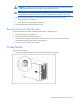
Tower cover
To remove the component:
1. Power down the server (on page 28).
2. Place the server on a flat, level surface with the access panel down.
3. Remove the two T-15 Torx screws that secure the tower cover to the server.