
ProLiant ML570 Generation 3 Server User Guide

Troubleshooting 98
•
If a fixed cable tray is available for the server, be sure the cords and cables connected to the server
are correctly routed through the tray.
• Be sure each device is properly seated.
• If a device has latches, be sure they are completely closed and locked.
• Check any interlock or interconnect LEDs that may indicate a component is not connected properly.
• If problems continue to occur, remove and reinstall each device, checking the connectors and sockets
for bent pins or other damage.
Diagnostic steps
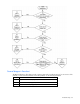
To effectively troubleshoot a problem, HP recommends that you start with the first flowchart in this section,
"Start diagnosis flowchart (on page 98)," and follow the appropriate diagnostic path. If the other
flowcharts do not provide a troubleshooting solution, follow the diagnostic steps in "General diagnosis
flowchart (on page 99)." The General diagnosis flowchart is a generic troubleshooting process to be used
when the problem is not server-specific or is not easily categorized into the other flowcharts.
The available flowcharts include:
• Start diagnosis flowchart (on page 98)
• General diagnosis flowchart (on page 99)
• Power-on problems flowchart ("Server power-on problems flowchart" on page 101)
• POST problems flowchart (on page 104)
• OS boot problems flowchart (on page 105)
• Server fault indications flowchart (on page 107)
The number contained in parentheses in the flowchart boxes corresponds to a table with references to
other detailed documents or troubleshooting instructions.
Start diagnosis flowchart
Use the following flowchart to start the diagnostic process.
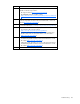
Item Refer to
1 "General diagnosis flowchart (on page 99)"
2
"Power-on problems flowchart ("Server power-on problems flowchart" on
page 101)"
3 "POST problems flowchart (on page 104)"
4 "OS boot problems flowchart (on page 105)"
5 "Server fault indications flowchart (on page 107)"