
ProLiant ML570 Generation 3 Server User Guide

Server component identification 9
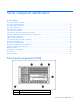
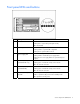
Front panel LEDs and buttons
Item Description Status
1 UID switch and LED Blue = Activated
Flashing blue = System being managed remotely
Off = Deactivated
2 Internal system health LED Green = Normal (system on)
Flashing Amber = System health is degraded
Flashing Red = System health is critical
3
External system health
(power supply) LED
Green = Normal (system on)
Flashing Amber = Redundant power supply failure
Flashing Red = Power supply failure. No operational power
supplies.
4
NIC 1 link/activity LED
(embedded NIC only)
Green = Linked to network
Flashing green = Linked with activity on the network
Off = No network connection
5
NIC 2 link/activity LED
(embedded NIC)
Green = Linked to network
Flashing green = Linked with activity on the network
Off = No network connection
6
Power on/Standby button
and LED
Green = System has AC power and is powered on
Amber = System has AC power and is in standby mode
Off = System has no AC power