Hardware options installation 79
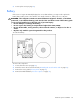
5.
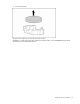
Remove the battery.
To replace the component, reverse the removal procedure.
Run RBSU to configure the system after replacing the battery. Refer to the HP ROM-Based Setup Utility
User Guide for more detailed information.