
ProLiant ML570 Generation 3 Server User Guide

Hardware options installation 77
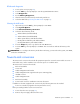
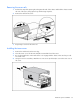
Installing the casters
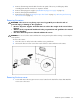
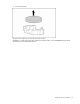
1. Using a T-15 Torx screwdriver, install the three T-15 Torx screws into each of the four casters.
Attaching the tower bezel
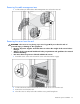
1. Set the server in its upright tower position.
CAUTION: Be sure to lock the casters and have the access panel in place before turning or reorienting the
server position.
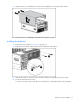
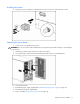
2. Install the two retention clips to the front of the server chassis.
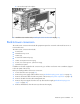
3. Line up the hinges on the tower bezel and slide the hinges into the corresponding slots.
4. Close the front bezel.
5. Reinstall the power supply, if applicable ("Redundant hot-plug power supply" on page 49).
6. Reinstall the hard drives, if applicable.
7. Plug in all cables ("Rear panel components" on page 10).