
ProLiant ML570 Generation 3 Server User Guide

Hardware options installation 73
2.
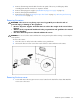
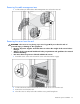
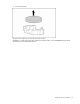
Slide the tower cover toward the rear of the server and pull the cover away from the chassis.
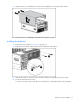
3. Turn the server over 180 degrees so that the access panel is on top.
Installing the rack bezel
1. Remove the access panel ("Access panel" on page 31).
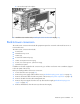
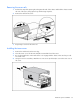
2. Remove the tower bezel retaining clips from the front panel of the chassis.
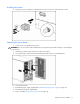
3. Align the three tabs on each side of the rack bezel with the corresponding slots in the chassis.
4. Secure the rack bezel to the server:
a. Insert six 6-32 Torx T-15 screws (three per side) into the corresponding holes on the rack bezel.