
ProLiant ML570 Generation 3 Server User Guide

Hardware options installation 72
3.
Remove all remaining external cables from the rear panel of the server, including any cables
extending from external connectors on expansion boards.
4. Remove all hot-plug power supplies ("Redundant hot-plug power supply" on page 49).
5. Remove all hot-plug SCSI hard drives.
6. Remove the tower bezel ("Removing the tape drive blank" on page 55, "Unlocking and removing
the tower bezel" on page 29).
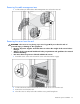
Removing the casters
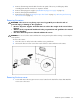
WARNING: The server is very heavy, up to 63.5 kg (140 lb). To reduce the risk of
personal injury or damage to the equipment:
• Remove all power supplies and hard drives to reduce the weight of the server before
lifting it.
• Observe local occupational health and safety requirements and guidelines for manual
material handling.
• Use more than one person to lift and stabilize the server.
CAUTION: Be sure to lock the casters and have the access panel in place before turning or reorienting the
server position.
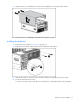
To remove the casters:
1. Place the server on a flat, level surface with the access panel down.
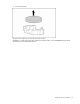
2. Unscrew the three T-15 Torx screws from each of the four casters and remove the casters.
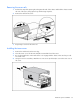
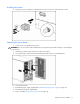
Removing the tower cover
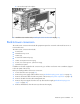
1. Loosen and remove the two (2) T-15 Torx screws located on the back of the chassis that attach the
tower cover to the server.