
ProLiant ML570 Generation 3 Server User Guide

Hardware options installation 70
11.
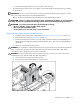
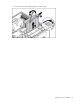
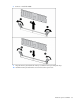
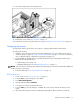
Move the locking switch to the locked position.
12. Configure the memory ("Configuring the memory" on page 70).
13. Replace the access panel ("Access panel" on page 31).
14. Reinstall the server into the rack (rack servers only) ("Installing the server into the rack" on page 37).
Configuring the memory
Configuring the memory system of the server requires configuring both hardware and software.
To configure the memory:
1. Install the correct amount of memory for the desired AMP mode. For a list of AMP options, refer to
"Memory options (on page 60, "Single- and Dual-rank DIMMs" on page 61)." For more information,
refer to "General memory configuration requirements (on page 60)."
2. Test the DIMMs for all AMP modes, except Advanced ECC, before configuring the AMP mode in
RBSU. The two testing methods are:
• POST memory test (on page 70)
• ROM-Based Diagnostics test ("ROM-based diagnostics" on page 71)
NOTE: If the total amount of memory has changed, the POST memory test will run automatically. Additional
memory testing is not necessary.
3. Select the AMP mode ("Selecting the AMP mode" on page 71).
POST memory test
1. Power on the server ("Power up the server" on page 27).
2. Press the F9 key, when prompted, to enter RBSU.
3. Select Advanced Options.
4. Change POST Speed Up to Disable.
5. Press any key to return to the RBSU main menu.
6. Press the F10 key, when prompted, to exit RBSU. The server reboots and tests all memory in the
system.
7. Once the memory has been tested, re-enable POST Speed Up for faster system boot, if desired.