
ProLiant ML570 Generation 3 Server User Guide

Hardware options installation 65
3.
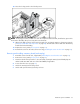
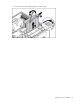
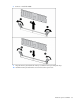
Reinstall the memory board in the slot from which it was removed.
The replacement procedures in this section apply to both hot-plug and non-hot-plug memory procedures,
except as noted.
IMPORTANT: Be sure to power down the server when performing board removal procedures in a server
that is not configured for Mirrored or Hot-Plug RAID Memory.
Observe the following warnings when performing a hot-plug replacement procedure.
WARNING: Always comply with all electrostatic and thermal guidelines to prevent bodily
injury and ensure a properly functioning system when performing hot-plug operations.
WARNING: To prevent personal injury from hazardous energy:
• Remove watches, rings, or other metal objects.
• Use tools with insulated handles.
• Do not place tools or metal parts on top of batteries.
Removing and installing a memory board (hot-plug)
1. Extend the server from the rack, if applicable ("Extending the server from the rack" on page 27).
2. Remove the access panel ("Access panel" on page 31).
3. Determine which memory board is to be removed by locating the memory board that displays an
amber Board Status LED. The Board Removal LED must be green. Take note of the failed DIMM, if
applicable.
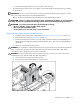
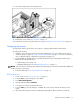
4. Unlock the memory board locking switch.
CAUTION: Do not attempt to unlock the memory board in an operational server when the board removal
LED is not green. This generates an audio alarm and causes the memory board LEDs to flash amber.
Proceeding to remove the memory board causes server failure.
CAUTION: To prevent server failure during a hot-plug removal procedure, do not remove the memory
board from the server until the board status LED stops flashing.
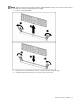
5. Unlock and open the memory board ejector lever.
6. Remove the memory board and place it on a flat surface.