
ProLiant ML570 Generation 3 Server User Guide

Hardware options installation 54
CAUTION: Always populate each media bay with either a device or a blank. Proper airflow can only be
maintained when the bays are populated. Unpopulated drive bays can lead to improper cooling and
thermal damage.
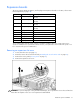
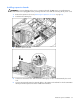
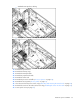
To install an optional drive:
1. Power down the server (on page 27).
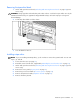
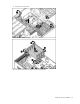
2. Use a T-15 Torx screwdriver to eject the drive blank, and pull the drive blank out of the chassis.
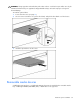
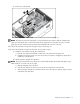
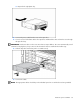
3. Install the optional drive into the server.
Removable media devices
A half-height SCSI tape drive or a half-height USB tape drive may be installed in the removable media
bay. A half-height CD-ROM, DVD-ROM, CD-R, or DVD-R drive is not supported.