
ProLiant ML570 Generation 3 Server User Guide

Hardware options installation 50
1.
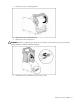
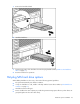
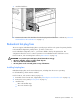
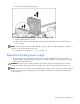
Remove the power supply blank in the secondary hot-plug power supply bay.
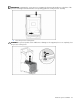
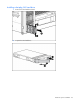
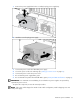
2. Install the second hot-plug power supply.
3. Connect the power cord to the redundant power supply.
4. Secure the power cords to the retaining clip ("Setting up a tower server" on page 37).
5. Connect the power cord to the power source.
6. Be sure that the power supply LED is green.
7. Be sure that the front panel external health LED is green ("Front panel LEDs and buttons" on page 9).
IMPORTANT: For maximum server availability, be sure that the two power supplies are powered by
separate AC power sources.
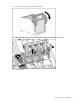
To replace the component, reverse the removal procedure.
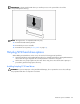
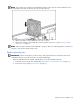
NOTE: If the server will be shipped to another location after configuration, install a shipping screw into
each power supply.