
ProLiant ML570 Generation 3 Server User Guide

Hardware options installation 40
CAUTION: To prevent possible server malfunction, do not mix processors of different speeds or cache
sizes. Refer to the label on the processor heatsink for a description of the processor.
IMPORTANT: Populate the processors in the following order: 1, 2, 4, 3.
IMPORTANT: If upgrading processor speed or adding additional processors, update the system ROM
before installing the processor.
IMPORTANT: Processor socket 1 and PPM slot 1 must be populated at all times or the server does not
function properly.
IMPORTANT: Always install a PPM when you install a processor. The system fails to boot if the PPM is
missing.
IMPORTANT: To ensure proper cooling, be sure the processor baffle is installed at all times.
To install a processor:
1. Power down the server (on page 27).
2. Extend the server from the rack, if applicable ("Extending the server from the rack" on page 27).
3. Remove the access panel ("Access panel" on page 31).
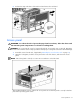
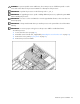
4. Remove the processor air baffle.