
ProLiant ML570 Generation 3 Server User Guide

Server operations 31
5.
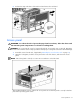
Release the snap at the base of the rack bezel and remove the rack bezel.
Access panel
WARNING: To reduce the risk of personal injury from hot surfaces, allow the drives and
the internal system components to cool before touching them.
CAUTION: Do not operate the server for long periods with the access panel open or removed. Operating
the server in this manner results in improper airflow and improper cooling that can lead to thermal damage.
1. Extend the server from the rack, if applicable ("Extending the server from the rack" on page 27).
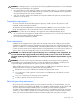
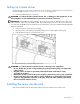
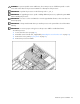
2. Open the locking latch, slide the access panel to the rear of the chassis, and remove the access
panel.
NOTE: If the locking latch is locked, use a Torx T-15 screwdriver to unlock the latch.
After installing hardware options, replace the access panel. Be sure that the panel is securely locked into
place before powering up the server.