
ProLiant ML570 Generation 3 Server User Guide

Server operations 30
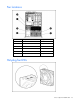
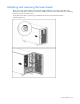
If necessary, remove the tower bezel.
Removing the rack bezel
The rack bezel must remain installed during normal server operations. The rack bezel remains installed for
all hardware options installations, except for the following situations:
• Removing or replace a SCSI hard drive cage
• Removing or replacing a SAS hard drive cage
• Converting the server from a rack model to a tower model
To remove the rack bezel:
1. Extend or remove the server from the rack ("Extending the server from the rack" on page 27).
2. Remove the tape drive blank or the tape drive ("Removing the tape drive blank" on page 55).
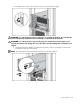
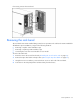
3. Using the Torx T-15 screwdriver, unscrew the three screws on each side of the rack bezel.
4. Push down on the snap and pull the rack bezel away from the chassis.