
ProLiant ML570 Generation 3 Server User Guide

Server component identification 22
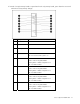
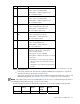
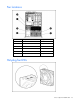
Item Description Status
9 DIMM 5 LED Green = DIMM installed
Amber = Failed or degraded DIMM
Flashing amber = DIMM configuration error
Off = No DIMM installed
10 DIMM 6 LED Green = DIMM installed
Amber = Failed or degraded DIMM
Flashing amber = DIMM configuration error
Off = No DIMM installed
11 Online Spare LED Green = Online spare mode
Amber = Degraded online spare mode
Flashing amber = Invalid AMP mode*
Off = Not in Online Spare mode
12
Hot-Plug Mirrored
LED
Green = Mirrored mode
Amber = Degraded mirrored mode
Flashing amber = Invalid AMP mode*
Off = Not in Mirrored mode
13 Hot-Plug RAID LED Green = RAID mode
Amber = Degraded RAID mode
Flashing amber = Invalid AMP mode*
Off = Not in RAID mode
14 Board Status LED
Off = Power off - memory board locking switch not
engaged or invalid memory configuration.
Green = Normal operation
Flashing green = Board is rebuilding
Flashing amber = DIMM on this board encountered
memory errors
Amber Flashing = one of the following conditions:
• Unlocking a memory board that should not be
removed
• Attempting to insert a memory board at runtime
that fails
*The following applies to an invalid AMP error. This error occurs when the current memory configuration is not valid
for the configured AMP mode:
•
If the mode selected is the desired mode, modify the DIMM/board configuration to support the
desired mode. Refer to the memory overview section.
• If the mode selected is not the desired mode, run RBSU and change the AMP mode. Refer to "HP
ROM-Based Setup Utility ("HP ROM-Based Setup Utility" on page 87)" for more information.
NOTE: If the Online Spare, Mirrored, and RAID LEDs are off, the server is in Advanced ECC mode. Refer to
"HP ROM-Based Setup Utility (on page 87)" for more information.
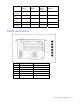
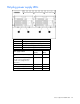
The following table illustrates the different LED combinations for a correctly configured memory board.
LED
Advanced ECC
Memory
Online Spare
Memory
Hot-Plug
Mirrored
Memory
Hot-Plug RAID
Memory
Board status Green Green Green Green