
ProLiant ML570 Generation 3 Server User Guide

Server component identification 19
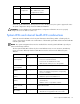
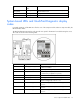
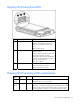
Hot-plug SCSI hard drive LEDs
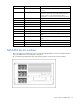
Item LED Description Status
1 Activity status On = Drive activity
Flashing = High activity on the drive or
drive is being configured as part of an
array.
Off = No drive activity
2 Online status
On = Drive is part of an array and is
currently working.
Flashing = Either (1) the drive is part of an
array being selected by an array
configuration utility; (2) Drive Identification
has been selected in HP SIM; or (3) drive
firmware is being updated.
Off = Drive is offline.
3 Fault status On = Drive failure
Flashing = Fault-process activity
Off = No fault-process activity
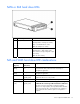
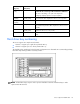
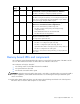
Hot-plug SCSI hard drive LED combinations
Activity
LED (1)
Online LED
(2)
Fault LED
(3)
Interpretation
On, off, or
flashing
On or off Flashing A predictive failure alert has been received for this drive.
Replace the drive as soon as possible.
On, off, or
flashing
On Off The drive is online and is configured as part of an array.
If the array is configured for fault tolerance and all other drives in the
array are online, and a predictive failure alert is received or a drive
capacity upgrade is in progress, you may replace the drive online.