
ProLiant ML570 Generation 3 Server User Guide

Server component identification 15
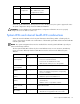
System LED and color
Internal health LED
color
Status
System temperature
alert (amber)
Flashing red
System temperature has exceeded OS cautionary level or
critical hardware level.
Fan (amber) Flashing red A required fan has failed.
Fan (amber) Flashing amber A redundant fan has failed.
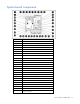
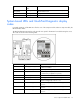
System board LEDs and QuickFind Diagnostic display
codes
In normal operations, all the LEDs are off unless one of the components fails. When a component fails, the
LED illuminates amber.
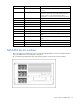
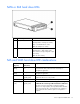
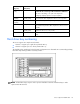
The QuickFind Diagnostic Display codes provide more specific information for troubleshooting the server.
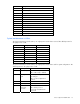
The codes are shown in the following table.
Code Component Explanation
01 Power supply cable(s)
System board to power supply cables: defective cables
or cables not installed
04 Fan board cable(s) Fan board power or signal cables are not installed.
05 Memory board
Base memory failure (memory board 1 is not installed or
no valid memory configuration is present)
06 SCSI board power cable SCSI board or cable is not present
07 PCI hot-plug switch board PCI hot-plug switch board or cable is not present.
08 System interlock
Main system interlock catch-all. Indicates an interlock
problem not flagged by codes 01 to 07.
f1 Processor 1 unsupported
Processor 1 unsupported. Replace with a supported
processor.
t2 Processor 2 unsupported
Processor 2 unsupported. Replace with a supported
processor.
t3 Processor 3 unsupported
Processor 3 unsupported. Replace with a supported
processor.