
ProLiant ML570 Generation 2 Server Maintenance and Service Guide



Removal and Replacement Procedures
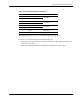
Table 2-9 provides a guideline for slot population order.
NOTE: The slot population order that follows is a recommendation only; any PCI or PCI-X expansion
board may reside in any slot.
Table 2-9: Recommended PCI-X Expansion Slot Population Order
Slot Number Population Order
1 1
2 5
Shared PCI-X bus
3 2
4 6
Shared PCI-X bus
5 3
6 7
Shared PCI-X bus
7* 4 PCI-X bus
*Slot 7 is recommended for the Remote Insight Lights-Out Edition II due to
internal cabling requirements.
The operating system detects the PCI devices in the slots in this order:
1-2-3-4-5-6-7
For more information about PCI bus architecture and numbering, refer to the white paper,
PCI Bus Numbering in a Windows NT Environment, at
www.hp.com/servers/proliant/manage
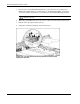
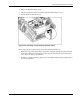
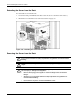
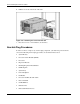
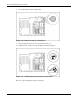
Reverse steps 1 through 9 to replace the expansion board.
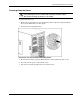
Preparing the Server for Non-Hot-Plug Procedures
Before replacing non-hot-plug devices, the following procedures must be performed:
•
•
•
Power down the server
Extend the server from the rack
Remove the server from the rack
2-36 HP ProLiant ML570 Generation 2 Server Maintenance and Service Guide