
ProLiant ML570 Generation 2 Server Maintenance and Service Guide



Removal and Replacement Procedures
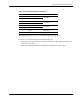
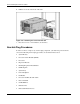
Table 2-8: PCI-X Expansion Slots and Buses
Item Slot Bus
1 Slot 1 (hot-plug)
2 Slot 2 (hot-plug)
Shared bus
3 Slot 3 (hot-plug)
4 Slot 4 (hot-plug)
Shared bus
5 Slot 5
6 Slot 6
Shared bus
7 Slot 7* PCI-X bus
*Slot 7 is recommended for the Remote Insight Lights-Out Edition II.
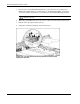
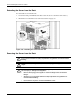
PCI-X Hot Plug expansion slots are accessible through the hot-plug door.
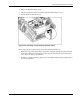
To remove an expansion board from a PCI-X Hot Plug slot:
1. Extend the server from the rack (rack model only). Refer to “Extending the Server from
the Rack” in this chapter.
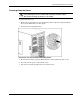
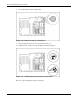
2. Open the hot-plug door. Refer to “Opening the Hot-Plug Door” in this chapter.
HP ProLiant ML570 Generation 2 Server Maintenance and Service Guide 2-33