
ProLiant ML570 Generation 2 Server Maintenance and Service Guide

Removal and Replacement Procedures
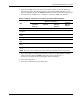
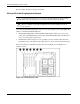
6. Reference the LEDs on the top of the memory board to make sure that the memory is
functioning properly. The following table describes what the LEDs look like for each
memory configuration when the DIMMs and memory board are functioning properly. For
more information on LEDs, refer to Chapter 4, “Connectors, LEDs, and Switches.”
Table 2-7: Memory LED States on a Properly Functioning Memory Board
Memory Configuration
LED
Advanced ECC
(Standard
Memory)
Online Spare
Memory
Single-Board
Mirrored
Memory
Hot-Plug
Mirrored
Memory
Memory Status Green Green Green Green
DIMMs 1-8, if
populated
Green Green Green Green
Online Spare
Status
Off Green Off Off
Mirroring Status Off Off Green Green
Online Spare
Text*
Off Green Off Off
Ready to Hot
Plug
Off Off Off Green
*If two memory boards are installed, the online spare text is only illuminated for the memory board in
slot 1.
NOTE: When the server is configured for online spare memory, Bank D is the online spare bank.
7. If any of the LEDs are illuminated solid amber, indicating a failed DIMM, or blinking
amber, indicating improper DIMM configuration, refer to the HP Servers
Troubleshooting Guide on the Documentation CD for instructions.
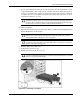
8. Close the hot-plug door.
9. Close the front bezel door (tower model only).
HP ProLiant ML570 Generation 2 Server Maintenance and Service Guide 2-23