
ProLiant ML570 Generation 2 Server Maintenance and Service Guide

Removal and Replacement Procedures
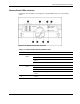
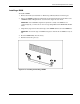
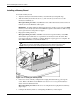
Memory Board LEDs and Icons
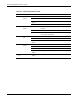
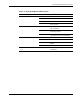
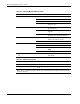
Use Figure 2-10 and Tables 2-2 through 2-6 to identify LEDs and icons on the memory
board.
Figure 2-10: Memory board LEDs and icons
Table 2-2: Advanced ECC (Standard) Memory LEDs
Item Description Indicator Status
Off Memory board is offline.
Green Memory board is online.
Flashing
green
Memory board is busy.
1 Memory
Status
Amber Memory error has occurred on this memory board.
Off DIMM is not installed.
Green DIMM is installed.
Amber Memory error has occurred on this DIMM.
8 DIMM 1-8
status
Flashing
amber
Configuration error has occurred.
1-4,
7, 8
All LEDs Flashing
amber
Memory board is in use; relock it immediately.
HP ProLiant ML570 Generation 2 Server Maintenance and Service Guide 2-13