
ProLiant ML570 Generation 2 Server Maintenance and Service Guide


Troubleshooting
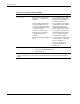
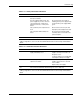
Table 5-5: Is the Internal Health LED Green?
Answer Possible Reasons Possible Solutions
No, it is amber A processor is in prefailure condition.
A DIMM is in prefailure condition.
One memory bank is valid, but another
bank is missing a DIMM.
One memory bank is valid, but another
bank has mismatched DIMMs installed.
One memory bank is valid, but another
bank has an unsupported DIMM type
installed.
A redundant fan has failed.
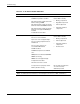
Use internal component
failure LEDs to identify:
• Missing components
• Degraded components
• Failed components
• Improperly installed
components
A processor has failed.
Processor 1 is not installed.
A processor is an unsupported type.
Processor voltage requirements are
mismatched.
Processor does not have an
associated PPM installed.
A PPM has failed.
A DIMM has experienced a multi-bit
error.
DIMM pairs have mismatched DIMMs.
DIMMs are missing.
DIMMs are an unsupported type.
A required fan has failed.
A thermal event has occurred.
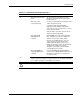
Use internal component
failure LEDs to identify:
• Missing components
• Failed components
• Improperly installed
components
• Thermal event
No, it is red
A component is not properly seated.
Memory board is missing.
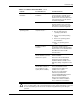
Be sure that all components
are seated securely.
Add memory board.
Yes If the internal health LED is illuminated green, refer to Table 5-6.
Note: For LED locations and functions, refer to Chapter 4, “Connectors, LEDs, and Switches."
5-6 HP ProLiant ML570 Generation 2 Server Maintenance and Service Guide