
ProLiant ML570 Generation 2 Server Maintenance and Service Guide

Connectors, LEDs, and Switches
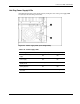
Hot-Plug Fan LEDs
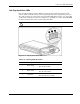
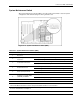
Each hot-plug fan has a corresponding status LED in the fan basket.
Figure 4-10: Hot-plug fan LEDs
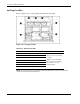
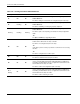
Table 4-15: Hot-Plug Fan LEDs
Fan Description Status
1 Standard processor fan
2
Optional redundant processor fan
3 Standard I/O fan
4 Optional redundant I/O fan
5 Drive fan
6 Drive fan
7
Drive fan
Green = The fan is operating
normally.
Amber = The fan has failed.
Off = The fan is not installed,
has no power, or is not
properly seated.
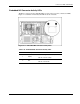
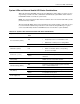
NOTE: The hot-plug rear processor air baffle and fan assembly LED is not shown. It also indicates
operational status as described in Table 4-15.
4-16 HP ProLiant ML570 Generation 2 Server Maintenance and Service Guide