
ProLiant ML570 Generation 2 Server Maintenance and Service Guide

Connectors, LEDs, and Switches
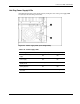
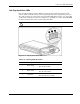
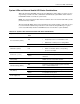
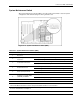
Hot-Plug Power Supply LEDs
Determine the hot-plug power supply status by noting the color of the power supply LED
located adjacent to the AC power socket.
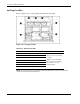
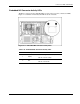
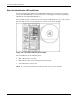
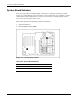
Figure 4-9: Power supply LEDs (rack configuration)
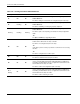
Table 4-14: Power Supply LEDs
Power Supply Condition 1 Power LED (Green) 2 Fault LED (Amber)
No AC power to any power
supply
Off Off
No AC power to a particular
power supply
Off On
AC power present; system in
standby mode
Blinking Off
Power supply on and
working properly
On Off
Power supply current limit
exceeded
On Blinking
HP ProLiant ML570 Generation 2 Server Maintenance and Service Guide 4-15