
Novell NetWare 6 performance tuning guidelines for ProLiant servers



Novell NetWare 6 performance tuning guidelines for ProLiant servers
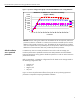
figure 12. tuning compared to default installation
Effects of Tuning on WebBench NSAPI Test
(Higher is Better)
0
2,000
4,000
6,000
8,000
10,000
12,000
14,000
16,000
18,000
1 4 8 12 16 20 24 28 32 36 40 44 48 52 56 60
# of Clients
Requests Per Second
Default
Tuned
Results: With a workload of 60 clients, the ProLiant ML570 G2 server serviced on
average 361% more requests when tuned compared to the results of the out-of-the-box
(default) installation. The significant difference in performance is also due to the fact by
default; logging is enabled whereas during tuning, it is disabled.
number of threads
per client
One of the methods of increasing the workload stress on your server is by increasing the
number of threads per client. That way the server can be saturated potentially faster with
fewer numbers of clients. This exercise should, however, be done with caution in order to
avoid negative effects on the clients due to insufficient client resources.
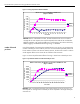
Figure 13 shows the performance effects of running 1 thread over 5 threads per client.
figure 13. performance effects of number of threads per client
Effects of Increasing the Number of Threads on WebBench Test
(Higer is Better)
0
2,000
4,000
6,000
8,000
10,000
12,000
14,000
16,000
18,000
1 4 8 12 16 20 24 28 32 36 40 44 48 52 56 60
# of Clients
Requests Per Second
1 Thread
5 Threads
Results: With a workload of 60 clients, the ProLiant ML570 G2 server serviced 17%
more requests on average with five threads per client compared to the single thread per
client test mix.
42