
Novell NetWare 6 performance tuning guidelines for ProLiant servers

Novell NetWare 6 performance tuning guidelines for ProLiant servers
1. With hyper-threading, a processor’s resources (execution units, cache, etc) are
shared between two logical processors. When the shared resources are busy being
used by one virtual processor, they aren’t available to the other virtual processor.
Code that is highly optimized to use the processor efficiently doesn’t see much
improvement when hyper-threading is turned on because the shared resources are in
use most of the time. Code that stalls the processor with complex instructions, memory
accesses, and cache contention does improve when Hyper-threading is turned on
because the idle shared resources are available to the other virtual shared processor.
When virtual processors compete for the shared resources, their individual
performance is often worse than it would have been if running uni-processor, but the
total performance of the two processors is usually better than one by itself.
2. To improve hyper-threading performance, the OS temporarily halts processors when
they are in idle; this reduces contention for the shared resources. There are two
exceptions to this – the OS never halts processor zero to improve legacy Netware
support, and the OS never halts processor 1 so that polling in ODI will happen
regularly – it is supposed to happen even when the processor is idle. So the worst
hyper-threading configuration is where processor 0 and processor 1 happen to be in
the same physical package to begin with. Usually a four processor system will pair
processors 0 & 4, 1 & 5, 2 & 6 and 3 & 7; this way, processor 0 and 1 don’t
compete with each other for the same shared resources.
3. To see a benefit with hyper-threading, you need to run applications that are:
• Multiprocessor enabled
• Need a lot of processor cycles
• Often stall the processor
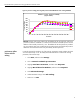
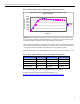
In light of the above, we are suggesting to temporarily disable hyper-threading via the
system BIOS when running the Ziff-Davis benchmark tests under NetWare 6 pending the
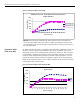
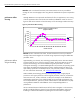
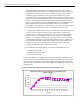
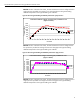
outcome of this investigation by Novell. Refer to figures 7 through 10 for the effects of
hyper-threading on performance when running NetBench or WebBench with single and
quad processors.
figure 7. effects of hyper-threading on NetBench performance: single processor
Performance Effects of Hyper-Threading (HT) on NetBench Test
(Higher is Better)
0
200
400
600
800
1,000
1,200
1 4 8 12162024283236404448525660
# of Clients
Throughput (Mbps)
HT-On
HT-Off
37