
Novell NetWare 6 performance tuning guidelines for ProLiant servers

Novell NetWare 6 performance tuning guidelines for ProLiant servers
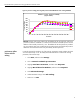
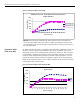
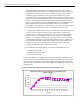
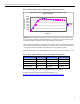
figure 4. performance effects on file caching
NetBench 7.0.2 Test - Client Side File Caching Comparison
(Higher is Better)
0
500
1,000
1,500
2,000
2,500
1 4 8 12 16 20 24 28 32 36 40 44 48 52 56 60
Number of Clients
Throughput (Mbps)
File Caching OFF
File Caching ON
Results: Using the Novell Traditional File System (TFS) and with a workload of 60
clients, the ProLiant ML570 G2 server (shown in figure 4) provided an average 321%
more throughput across the entire length of the graph with file caching turned on versus
file caching turned off.
performance effects
of TFS versus NSS
By default, the NSS file system is installed during the installation of NetWare 6 unless you
decide to override it during normal installation. The choice of which file system to use
depends on several issues, including storage requirements, security, etc. NSS is typically
recommended in enterprise-type operations requiring terabytes of storage. On the other
hand, the Novell Traditional File System (TFS) is Novell’s original file system. It is used
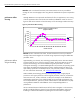
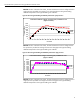
typically for small to medium size business operations. Figure 5 shows the performance
effects of TFS compared to NSS. A more in-depth comparison of the Novell TFS and NSS
is beyond the scope of this document.
figure 5. performance effects of TFS compared to NSS
NetBench 7.0.2 Test - NSS vs. TFS Comparison
(Higher is Better)
0
500
1,000
1,500
2,000
2,500
1 4 8 12162024283236404448525660
Number of Client(s)
Throughput (Mbps)
TFS
NSS
35