
Novell NetWare 6 performance tuning guidelines for ProLiant servers

Novell NetWare 6 performance tuning guidelines for ProLiant servers
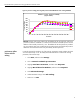
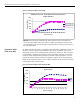
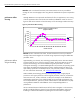
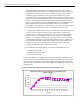
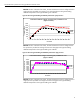
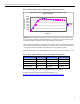
figure 3. processor scaling (1P through 4P) on the ProLiant ML570 G2 server running NetBench
NetBench 7.0.2 Test - Processor Scalability
(Higher is Better)
0
200
400
600
800
1000
1200
1400
1600
1 4 8 12162024283236404448525660
# of Clients
Throughput (Mbps)
1-P
2-P
3-P
4-P
Results: Positive scaling was evident with the addition of the second, third, and fourth
processors under this workload. For instance, the transaction rates did improve with the
addition of the second processor by 13%. The addition of the third processor provided
5% more requests than was provided by the second processor and the fourth processor
added 5% extra transactions than was provided by the third processor.
performance effects
of client side file
caching
In Novell Client32 for Windows, the “file caching” parameter controls whether the client
will cache files locally or not. To modify the Novell Client32 for windows file caching
parameter, follow these steps:
1. Click Start, and then select Settings.
2. Click on Network and Dial-up Connections.
3. Highlight Local Area Connection, and then select Properties.
4. Highlight Novell Client for Windows, and then select Properties.
5. Select Advanced Settings.
6. Under Parameter Groups, select File Caching.
7. Make sure it is ON.
34