
Novell NetWare 6 performance tuning guidelines for ProLiant servers

Novell NetWare 6 performance tuning guidelines for ProLiant servers
29
category
description
monitoring /
viewing
diagnostics
performance /
statistics
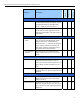
manage hardware (continued)
PCI devices Use this page to view the listing of Hardware
Instance Numbers (HIN) and display the PCI
configuration space for each HIN listed.
There is a HIN per hardware device.
√
other resources Use this page to display information about
drivers that have been registered with the
operating system and to view their resource
information.
√ √ √
manage eDirectory
access tree
walker
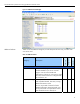
This page shows the NDS tree object where
you can select a subordinate NDS object.
Objects that contain subordinates are
displayed with a ‘+’ character preceding the
object. Objects without this character are
leaf objects. Selecting a leaf object shows
the attribute and value information.
√
view eDirectory
partitions
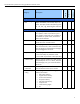
This page shows a list of NDS partitions
and/or replicas that exists in a tree of the
server.
√
user server groups
build group This page allows you to select servers you
want to include into a group in order to
allow you to perform similar operations on a
group rather on each individual server at a
time.
√
load group file Use this page to build a Server Group Web
page from the server group configuration file
specified.
√
access other servers
managed server
list
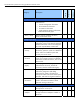
Use this page to access any of the servers
displayed on the lists. Click on the server
name to access it.
√ √ √
basic file access Used to build a list of servers in the same
NDS tree. To build the list, click “Yes”. If you
click “Cancel” the main page of the NRM is
displayed.
√ √ √