
Novell NetWare 6 performance tuning guidelines for ProLiant servers

Novell NetWare 6 performance tuning guidelines for ProLiant servers
28
category
description
monitoring /
viewing
diagnostics
performance /
statistics
manage server (continued)
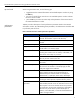
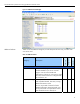
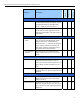
view statistics Use this page to view server statistical
information on:
• network management information
• kernel statistical information
• LSL statistical information
• media manager statistical information
health statistics trend graph
√
√
down / restart Use this page to gracefully shut down,
restart, and reset the server.
√
manage applications
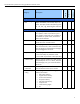
list modules Use the page to display sorted NLM
information. Click on any NLM of interest for
detailed information such as which flags are
set, list of imported NLMs or data items.
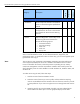
protected
memory
Use this page to view information relating to
the memory protection system on a NetWare
server and a list of address spaces that
currently exist on the server.
√
system
resources
Use this page to view all resource tag types
in the server operating system. For detailed
information on about a resource, click on the
resource link.
√
√
NetWare
registry
Use this page to view key registry
information for the server, execute the
consistency checker and flush the registry.
√ √ √
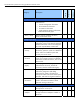
Winsock 2.0 Use this page to view Winsock 2.0 resource
information, diagnostics and debug
information for sockets, information for
Transport Providers and Active Name Space
Providers, and small set of general statistics.
√ √ √
protocol
information
Use this page to view or monitor general or
specific information and statistics about
protocols running on the server.
√ √ √
manage hardware
processors Use this page to view information about
each processor on the server.
√
disk / LAN
adapters
Use this page to view information about disk
storage and network adapters installed on
the server.
√
√