
Novell NetWare 6 performance tuning guidelines for ProLiant servers

Novell NetWare 6 performance tuning guidelines for ProLiant servers
27
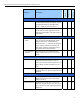
category
description
monitoring /
viewing
diagnostics
performance /
statistics
diagnose server (continued)
reports / log
files
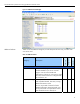
Allows you to view a Server Configuration
Report immediately and send the report via
email. The report contains the following files:
All - .ncf, .bat, .cfg, abend.log files and more.
√ √
manage server
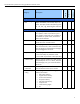
volumes Displays a pie chart of free/used information
on a specific volume. It also allows you to
view specific volume info such as whether it
is mounted, file system name, and several
other volume attributes.
√ √
console screens Lists all the options that can be used to
access the server console screens.
√
connections Use this page as a connection manager to
view connection info, clear connections that
are not logged on and broadcast message to
everyone logged on the server.
√
set parameters Use this page to:
- view and modify set parameter values
- view hidden set parameter values (Yes/No)
√
√
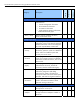
schedule tasks Use this page to schedule any valid console
commands (such as to run .ncf file, load nlm,
send messages, etc.) you want executed on
the server.
√
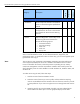
console
commands
Use this page to view a list of commands that
can be executed on the server console.
view memory
config
Use this page to view the following system
memory information:
• total system memory
• original cache memory
• current cache memory
• file system memory
• reserved swap memory
• swap file size
• virtual memory pages
• etc.
√
√