
Novell NetWare 6 performance tuning guidelines for ProLiant servers

Novell NetWare 6 performance tuning guidelines for ProLiant servers
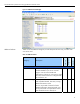
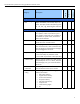
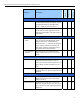
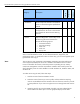
table 9. Available options window performance parameters
(continued)
menu option description
file open / lock activity Displays a list of file system elements in a hierarchical
file system. To locate a file, select the volume and the
directories from the volume list. At the file level list,
select the file.
disk cache utilization Displays disk cache utilization statistics. Use this
information to determine when to add more memory for
cache. For more info, press F1 for help while in this
screen.
system resources Displays server memory statistics including the list of the
resource types defined by the operating system. Use the
server memory statistics to assess server memory. Press
F1 for help while in this screen.
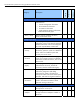
virtual memory Displays server virtual memory information. Available
options within this screen include known address spaces
and swap files. The address spaces option displays a
list of memory address spaces. The swap files option
displays a list of disk files for temporary storing of data
and programs running in memory. Press F1 while in this
screen for descriptions of the virtual memory information
fields.
kernel Displays server kernel information statistics pertaining to
all threads, processors, interrupts, and busiest threads.
Select any of the listed options and press Enter for
detail option information. Press F1 for more information
about that option.
server parameters Displays parameter categories similar to that of the SET
command. Select any category listing and press Enter
to show category fields. To edit, highlight the field and
press Enter. For help on changing the parameter
values, press F1 while in the screen of the selected
category.
For more information on the parameters listed in tables 8 and 9, visit:
www.novell.com/documentation/lg/nw51/utlrfenu/data/h74jxvbx.html
.
24