
Novell NetWare 6 performance tuning guidelines for ProLiant servers

Novell NetWare 6 performance tuning guidelines for ProLiant servers
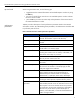
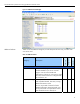
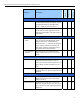
table 8. General Information window performance parameters
(continued)
menu option description
current service
processes
The number of service processes (threads or task
handlers) that are currently allocated to service client
NCP requests. As the number of requests from clients
increase, the server creates more service processes until
the maximum allocated is reached. When the maximum
is reached, server performance might degrade due to
insufficient number of service processes.
current connections Number of licensed and unlicensed connections (both
are considered active connections). A license for a
NetWare network allows a user to attach to as many
servers in the NDS tree as needed. An unlicensed
connection does not use a license.
open files Number of files currently being accessed by the server
and other clients. Certain files, such as hidden files that
support Novell eDirectory, are always open.
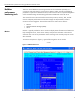
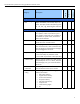
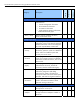
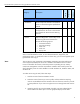
Table 9 provides a description of each performance parameter listed on the Available
options window.
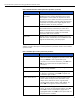
table 9. Available options window performance parameters
menu option description
connections Displays a list of active connections on the server. To
select a connection, highlight the connection name, and
then press Enter to show opened files by the
connection. To sort active connections, press F3. Press
F8 for more options that can be performed on a
connection.
storage devices Displays a list of storage device objects registered in the
media manager database.
volumes Displays a list of mounted volumes. Highlight a volume
to display its information. Press Tab to expand and
activate the upper window.
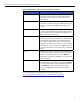
LAN / WAN Drivers Displays a list of LAN driver instances loaded on the
server. Select an entry for more information on the
object such as LAN driver version, logical board
number, board instance number, node address, etc.
Press Tab to view generic counter information.
loaded modules Displays a list of all program modules loaded on the
server. To sort the list of displayed modules, press F3.
Press F4 to recover unused memory pages from a
highlighted module. Press F8 for more options that can
be performed on a module.
23