
Novell NetWare 6 performance tuning guidelines for ProLiant servers

Novell NetWare 6 performance tuning guidelines for ProLiant servers
tips and tricks
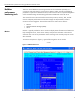
When using the Monitor tool, use the following tips:
• toggle between the General Information and Available Options windows by using
the Tab key.
• the arrow to the left of the vertical line in the Available Options window indicates
the menu can be scrolled.
• press the F1 key to access the online help and explanations of the entries listed in
the General Information window.
performance
parameters
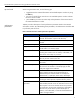
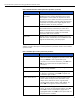
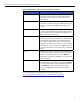
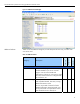
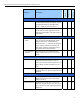
Table 8 provides a description of each performance parameter listed on the General
Information window. By understanding these parameters, the administrator should be able
to proficiently tune the server.
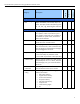
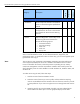
table 8. General Information window performance parameters
menu option description
utilization The average percent processor utilization during the last
second. The reminder is spent in the idle loop.
server up time The elapse time since the server was most recently
started.
online processors Total number of active processors.
original cache buffers The amount of cache buffers available at boot time. A
cache buffer is 4 K memory page
total cache buffers The number of cache buffers currently available for file
caching. The number varies as memory is allocated / de-
allocated to other NLMs or processes.
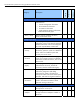
dirty cache buffers Number of cache buffers with updated information that
has not yet been written to the disk
long term cache hits Cumulative percentage of disk block requests already in
the cache.
current disk requests Number of outstanding disk I/O request that are queued
for service. If this number is consistently high, the disk
subsystem might be the bottleneck.
packet receive buffers Number of buffers available to the file system for holding
client requests until they can be processed. This is
determined by the network board. For example, the
Ethernet NIC is 1536 bytes, FDDI card is 4096 bytes.
directory cache buffers The number of buffers available to the file system for
caching the most frequently requested directory entries.
maximum service
processes
The maximum number of service processes (threads or
task handlers) that the server can allocate to service client
NCP requests. The server allocates the service processes
as need (within the minimum and maximum parameters).
Each service process takes up about 4096 bytes of
memory. Once allocated, it cannot be de-allocated even
when no longer needed.
22